


Netflix is a popular streaming platform that is above the charts these days. Almost every entertaining movie and series are available on Netflix within a click. However, not everybody has an internet connection 24/7. Whether you live in a far off area or planning to go on a trip and looking for something to pass the time, you will have to download movies on your Laptop.
Although most videos on Netflix are not available to download for Laptop, we got something for you. We will show you how to download Netflix movies on a laptop even though some of them aren’t available to download in the official app.
Use StreamFab Netflix Downloader
Suppose your favorite movie is not available to download on Netflix, no need to worry because StreamFab has got you covered. Streamfab Netflix Downloader is a highly user-friendly software made to help you download Netflix movies and enjoy them later at your ease.
You might think it will be complex software where you will have to fight multiple options, but that’s not the case. Streamfab Netflix Downloader is exceptionally straightforward. The best part about StreamFab is its compatibility. The videos downloaded from StreamFab Netflix Downloader are saved as MP4 files which are compatible with various devices. Moreover, it is an all-in-one laptop that will provide you with many other options, like Amazon Prime Video, Hulu, hbo, etc. instead of just Netflix download.
Check out the steps of downloading Netflix movies and shows with StreamFab Downloader below.
Step 1
Download and install StreamFab Netflix Downloader on your laptop.
Step 2
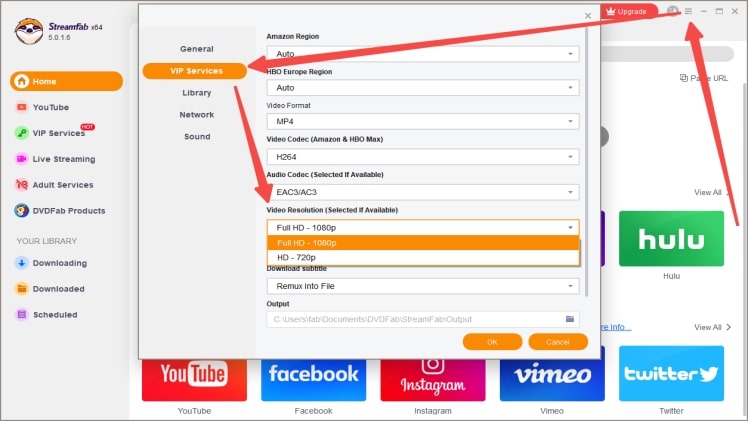
Set the video quality from: Setting > VIP Services > Video Resolution
Step 3
Go to VIP Services from the left panel of the homepage, and click Netflix from the right.
Step 4
Log in to your Netflix account and search for a video you like.
Step 5
Click to play the video you want to download and then the Download window will appear automatically. Select to Download Now or Add to Queue after choosing the language of audio and subtitle.
Download Directly from Netflix
If you have a Netflix subscription on your laptop, downloading available movies is a breeze.
- Open the Netflix app on your laptop. If you’re using the app for the first time, you will get a pop-up notice with a button to download movies and TV series.
- Go through the list, check every movie and click on your favorite one. If you want a specific movie, you can manually enter the movie’s name and search for it.
- Now, click on the download icon at the bottom, your movie will begin to download.
It won’t take much time to download if you have a good internet connection. Moreover, click on the left menu and go to My Downloads once the download is complete. You will see all your downloads, including movies and TV series, out there. You can manage, delete or copy all your downloads from this menu.
Smart Download is a built-in tool in the Netflix app that helps you minimize space usage by removing TV series you’ve already viewed. Next time, when you connect to the internet, it will auto-update the next uploaded episodes.
The Smart download is a helpful feature, but you can turn it on or off from the My Downloads menu.
Conclusion
It might look like rocket science for those who don’t know how to download a Netflix movie on their laptop. But, for those people who have gone through this article, downloading is like a walk in a park. Get StreamFab Netflix Downloader, follow each step above carefully and enjoy your favorite Netflix movies wherever you are.
1Filmy4wap upload movies one or two days after the official release.
4Movierulz Watch Latest Online Movies Free Download Website 2022
